RAGFlow Vector Stores
Litellm support creation and management of datasets for document processing and knowledge base management in Ragflow.
| Property | Details |
|---|---|
| Description | RAGFlow datasets enable document processing, chunking, and knowledge base management for RAG applications. |
| Provider Route on LiteLLM | ragflow in the litellm vector_store_registry |
| Provider Doc | RAGFlow API Documentation ↗ |
| Supported Operations | Dataset Management (Create, List, Update, Delete) |
| Search/Retrieval | ❌ Not supported (management only) |
Quick Start
LiteLLM Python SDK
import os
import litellm

# Set RAGFlow credentials
os.environ["RAGFLOW_API_KEY"] = "your-ragflow-api-key"
os.environ["RAGFLOW_API_BASE"] = "http://localhost:9380"  # Optional, defaults to localhost:9380

# Create a RAGFlow dataset
response = litellm.vector_stores.create(
    name="my-dataset",
    custom_llm_provider="ragflow",
    metadata={
        "description": "My knowledge base dataset",
        "embedding_model": "BAAI/bge-large-zh-v1.5@BAAI",
        "chunk_method": "naive"
    }
)

print(f"Created dataset ID: {response.id}")
print(f"Dataset name: {response.name}")
LiteLLM Proxy
1. Configure your vector_store_registry
- config.yaml
- LiteLLM UI
model_list:
  - model_name: gpt-4o-mini
    litellm_params:
      model: gpt-4o-mini
      api_key: os.environ/OPENAI_API_KEY

vector_store_registry:
  - vector_store_name: "ragflow-knowledge-base"
    litellm_params:
      vector_store_id: "your-dataset-id"
      custom_llm_provider: "ragflow"
      api_key: os.environ/RAGFLOW_API_KEY
      api_base: os.environ/RAGFLOW_API_BASE  # Optional
      vector_store_description: "RAGFlow dataset for knowledge base"
      vector_store_metadata:
        source: "Company documentation"
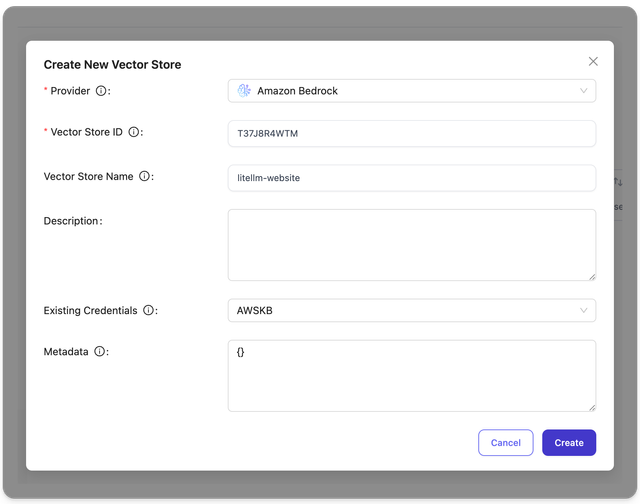
On the LiteLLM UI, Navigate to Experimental > Vector Stores > Create Vector Store. On this page you can create a vector store with a name, vector store id and credentials.
2. Create a dataset via Proxy
- Curl
- OpenAI Python SDK
curl http://localhost:4000/v1/vector_stores \
  -H "Content-Type: application/json" \
  -H "Authorization: Bearer $LITELLM_API_KEY" \
  -d '{
    "name": "my-ragflow-dataset",
    "custom_llm_provider": "ragflow",
    "metadata": {
      "description": "Test dataset",
      "chunk_method": "naive"
    }
  }'
from openai import OpenAI

# Initialize client with your LiteLLM proxy URL
client = OpenAI(
    base_url="http://localhost:4000",
    api_key="your-litellm-api-key"
)

# Create a RAGFlow dataset
response = client.vector_stores.create(
    name="my-ragflow-dataset",
    custom_llm_provider="ragflow",
    metadata={
        "description": "Test dataset",
        "chunk_method": "naive"
    }
)

print(f"Created dataset: {response.id}")
Configuration
Environment Variables
RAGFlow vector stores support configuration via environment variables:
RAGFLOW_API_KEY- Your RAGFlow API key (required)RAGFLOW_API_BASE- RAGFlow API base URL (optional, defaults tohttp://localhost:9380)
Parameters
You can also pass these via litellm_params:
api_key- RAGFlow API key (overridesRAGFLOW_API_KEYenv var)api_base- RAGFlow API base URL (overridesRAGFLOW_API_BASEenv var)
Dataset Creation Options
Basic Dataset Creation
response = litellm.vector_stores.create(
    name="basic-dataset",
    custom_llm_provider="ragflow"
)
Dataset with Chunk Method
RAGFlow supports various chunk methods for different document types:
- Naive (General)
- Book
- Q&A
- Paper
response = litellm.vector_stores.create(
    name="general-dataset",
    custom_llm_provider="ragflow",
    metadata={
        "chunk_method": "naive",
        "parser_config": {
            "chunk_token_num": 512,
            "delimiter": "\n",
            "html4excel": False,
            "layout_recognize": "DeepDOC"
        }
    }
)
response = litellm.vector_stores.create(
    name="book-dataset",
    custom_llm_provider="ragflow",
    metadata={
        "chunk_method": "book",
        "parser_config": {
            "raptor": {
                "use_raptor": False
            }
        }
    }
)
response = litellm.vector_stores.create(
    name="qa-dataset",
    custom_llm_provider="ragflow",
    metadata={
        "chunk_method": "qa",
        "parser_config": {
            "raptor": {
                "use_raptor": False
            }
        }
    }
)
response = litellm.vector_stores.create(
    name="paper-dataset",
    custom_llm_provider="ragflow",
    metadata={
        "chunk_method": "paper",
        "parser_config": {
            "raptor": {
                "use_raptor": False
            }
        }
    }
)
Dataset with Ingestion Pipeline
Instead of using a chunk method, you can use an ingestion pipeline:
response = litellm.vector_stores.create(
    name="pipeline-dataset",
    custom_llm_provider="ragflow",
    metadata={
        "parse_type": 2,  # Number of parsers in your pipeline
        "pipeline_id": "d0bebe30ae2211f0970942010a8e0005"  # 32-character hex ID
    }
)
Note: chunk_method and pipeline_id are mutually exclusive. Use one or the other.
Advanced Parser Configuration
response = litellm.vector_stores.create(
    name="advanced-dataset",
    custom_llm_provider="ragflow",
    metadata={
        "chunk_method": "naive",
        "description": "Advanced dataset with custom parser config",
        "embedding_model": "BAAI/bge-large-zh-v1.5@BAAI",
        "permission": "me",  # or "team"
        "parser_config": {
            "chunk_token_num": 1024,
            "delimiter": "\n!?;。;!?",
            "html4excel": True,
            "layout_recognize": "DeepDOC",
            "auto_keywords": 5,
            "auto_questions": 3,
            "task_page_size": 12,
            "raptor": {
                "use_raptor": True
            },
            "graphrag": {
                "use_graphrag": False
            }
        }
    }
)
Supported Chunk Methods
RAGFlow supports the following chunk methods:
naive- General purpose (default)book- For book documentsemail- For email documentslaws- For legal documentsmanual- Manual chunkingone- Single chunkpaper- For academic paperspicture- For image documentspresentation- For presentation documentsqa- Q&A formattable- For table documentstag- Tag-based chunking
RAGFlow-Specific Parameters
All RAGFlow-specific parameters should be passed via the metadata field:
| Parameter | Type | Description |
|---|---|---|
avatar | string | Base64 encoding of the avatar (max 65535 chars) |
description | string | Brief description of the dataset (max 65535 chars) |
embedding_model | string | Embedding model name (e.g., "BAAI/bge-large-zh-v1.5@BAAI") |
permission | string | Access permission: "me" (default) or "team" |
chunk_method | string | Chunking method (see supported methods above) |
parser_config | object | Parser configuration (varies by chunk_method) |
parse_type | int | Number of parsers in pipeline (required with pipeline_id) |
pipeline_id | string | 32-character hex pipeline ID (required with parse_type) |
Error Handling
RAGFlow returns error responses in the following format:
{
    "code": 101,
    "message": "Dataset name 'my-dataset' already exists"
}
LiteLLM automatically maps these to appropriate exceptions:
code != 0→ Raises exception with the error message- Missing required fields → Raises
ValueError - Mutually exclusive parameters → Raises
ValueError
Limitations
- Search/Retrieval: RAGFlow vector stores support dataset management only. Search operations are not supported and will raise
NotImplementedError. - List/Update/Delete: These operations are not yet implemented through the standard vector store API. Use RAGFlow's native API endpoints directly.
Further Reading
Vector Stores: